
Learn HTML & CSS Correctly
This just may be the most comprehensive HTML & CSS course on the internet. With clearly explained concepts in short and to the point screencast videos, learn the fundamentals & build beautiful and professional websites. (Cheatsheets, references, and tools included.) --- IMPORTANT: This course is FREE 🆓 and always will be.
Course content
71 lessons- 1Tools you need for the HTML/CSS course1:59
- 2Overview of the VS Code Text Editor4:57
- 3Code your first webpage3:59
- 4What is HTML Really?3:16
- 5What does HTML look like?2:46
- 6HTML Elements7:20
- 7HTML Elements - Continued3:36
- 8Common HTML Elements (Cheatsheet included)3:26
- 9HTML is a forgiving language3:47
- 10Basic Markup of HTML5:18
- 11The <h1>...<h6>, <i> and <strong> elements5:18
- 12Learn to link webpages via the anchor <a> element4:04
- 13Relative vs Absolute Paths - linking continued5:50
- 14<div> and <span> elements6:36
- 15Making lists in HTML via <ul>, <ol> and <li> elements5:36
- 16Making nested lists + Homework4:31
- 17Adding special characters in your webpage5:50
- 18Emmet shortcuts and code comments3:37
- 19<meta> elements and what they are about3:19
- 20<meta> description and keyword elements for SEO3:33
- 21<blockquote> and <pre> elements for special text formatting5:43
- 22Adding images with the <img> element5:11
- 23Using <video> and <audio> elements5:56
- 24Semantic Elements + Homework4:26
- 25Intro to CSS - Making the webpages beautiful4:22
- 26Intro to CSS continued4:10
- 27<style> element & using CSS selectors5:38
- 28Organize your CSS is its own file4:55
- 29CSS id selector (# hash sign)4:20
- 30CSS class selector (. dot sign)3:52
- 31Select all elements with asterisk (*) selector0:58
- 32Using multiple selectors together (using comma and more)4:40
- 33CSS Combinators selectors (~ + > etc.)7:50
- 34Pseudo Selectors (:visited: :hover :active :focus)6:04
- 35Chrome Developer Tools - Intro6:43
- 36Colors in CSS3:19
- 37Apply multiple CSS classes + write notes with code comments2:59
- 38Fonts: Change & add custom fonts6:20
- 39Background CSS Property. Change color, images and more7:39
- 40Common CSS Units - (px, em, rem, %)7:01
- 41Common CSS Units - (rem)2:39
- 42CSS Margin and Padding9:49
- 43CSS border property4:00
- 44CSS border style2:05
- 45Size elements with 'width' and 'height' property3:21
- 46Use 'box-sizing' for more control on element sizing3:43
- 47'border-radius' Curve borders and make custom shapes.7:58
- 48<div> vs <span> the real difference4:36
- 49Using 'display' property of CSS & 'inline-block'3:19
- 50'float' & 'clear' property - Moving elements around.4:38
- 51Hide content with `overflow`, `visibility` and `display` property3:36
- 52Clearfix: Hack to fix webpage spacing issue3:51
- 53Project: Blog Design - Create beautiful looking website5:20
- 54Project: Blog Design (Part 2/7) - Layout the HTML9:09
- 55Project: Blog Design (Part 3/7) - Styling the header4:01
- 56Project: Blog Design (Part 4/7) - Styling main and footer area4:02
- 57Project: Blog Design (Part 5/7) - Styling sidebar3:10
- 58Project: Blog Design (Part 6/7) - Styling articles2:17
- 59Project: Blog Design (Part 7/7) - Additional Pages5:13
- 60'position' - Control element position within your page8:10
- 61Project: Coupon (using `absolute` & `relative` position)5:21
- 62CSS Flexbox & CSS Grid - More layout methods3:02
- 63CSS Priority Order6:04
- 64Additional Resources - Codepen + HTML Cheatsheet5:18
- 65<table> Making tables in HTML5:32
- 66<table> Making tables in HTML continued2:41
- 67<iframe> Embedding other webpages in your webpage4:16
- 68Creating forms and understanding how they work11:17
- 69Creating form - continued6:41
- 70Using external CSS libraries in your projects6:42
- 71Conclusion and next steps3:28
HTML Cheatsheet
- Download HTML Cheatsheet (PDF)
- Star HTML Cheatsheet on Github
- Share HTML/CSS Cheatsheet Link: https://ilovecoding.org/blog/htmlcss-cheatsheet
CSS Cheatsheet
- Download CSS Cheatsheet (PDF)
- Star CSS Cheatsheet on Github
- Share HTML/CSS Cheatsheet Link: https://ilovecoding.org/blog/htmlcss-cheatsheet

What is HTML?
HTML abbreviation for Hyper Text Markup Language, is a Markup Language to put together the structure of a web page. Think of HTML as the skeleton of a webpage. There is no website or webpage on the internet that does not use HTML. Without HTML, the web would not be possible.
What HTML is not
HTML is not a programming language. Please don't confuse the two concepts. A programming language has logical and computational capability to instruct a computer to do some operations. A markup language, on the other hand, is static and is only used to organize data in a specific structure. HTML in our case is used to give structure to a web page.
What is CSS?
CSS stands for Cascading Style Sheets. Think of it as the skin and clothing for the HTML webpage. CSS is simply a list of style properties that get applied to HTML elements. Just the way clothing is put onto a human body, similarly, CSS styling is applied on HTML elements. CSS enhances the colors, layout, and styling of the HTML webpage, making it look more beautiful and professional.
Why learn HTML and CSS?
Unlike programming languages, HTML and CSS have NO competition. If you want to make web pages, start a career in web design, web development or even web journalism, the basic knowledge of HTML and CSS is a must have.
Fortunately, the foundation of HTML and CSS are not that difficult. You can start getting comfortable with HTML in a matter of hours. Basic CSS is also not that difficult, however, CSS can get complicated when trying to build advanced layouts.
This course, "Learn HTML and CSS Correctly", will hold your hand to teaching you the basics and advanced concepts of HTML and CSS, so you are comfortable building simple and advanced websites.
What can you build with HTML and CSS?
Any website layout! Yes, any. All, yes all websites use HTML and CSS, and once you get a hang of it, you can build websites as beautiful as Airbnb, Facebook, Twitter, Amazon (You name it).
Remember one thing! HTML and CSS will only help you build website layouts and static websites. The intelligent aspect of a webpage, such as a login capability, storing information in a database and advanced interactivity is built with a programming language such as JavaScript. Once you are comfortable with HTML and CSS and have built some projects, your next step is to learn JavaScript
What resources should you refer when learning HTML and CSS
Take this course as you guide! For reference, I highly recommend the HTML reference on Mozilla. They also have some really good guides here.
Web Docs on Mozilla (MDN) is the most authentic and trusted source to lookup information on web technology - HTML, CSS and, JavaScript. Whenever I need more information on a topic, I google the following query "topic name mozilla"
What will you learn in this Free video course?
- Basic syntax of HTML
- Common HTML Elements
- Must have markup on every webpage
- How to create headline, paragraph and lists
- How to create forms elements - text fields, radio/checkbox buttons, select boxes
- How to structure a webpage layout
- What are semantic elements and why to use them
- Basic syntax of CSS
- Common CSS properties
- CSS selectors and its type
- Using CSS to enhance website layout
- Importing files in your HTML document
- Advanced positioning of elements with CSS
- Adding custom fonts
What will you create with Learn HTML & CSS Correctly video course?
The goal of this course is to give you practical, real-world examples so you are off to creating your vision.
For that, you will create two finished projects
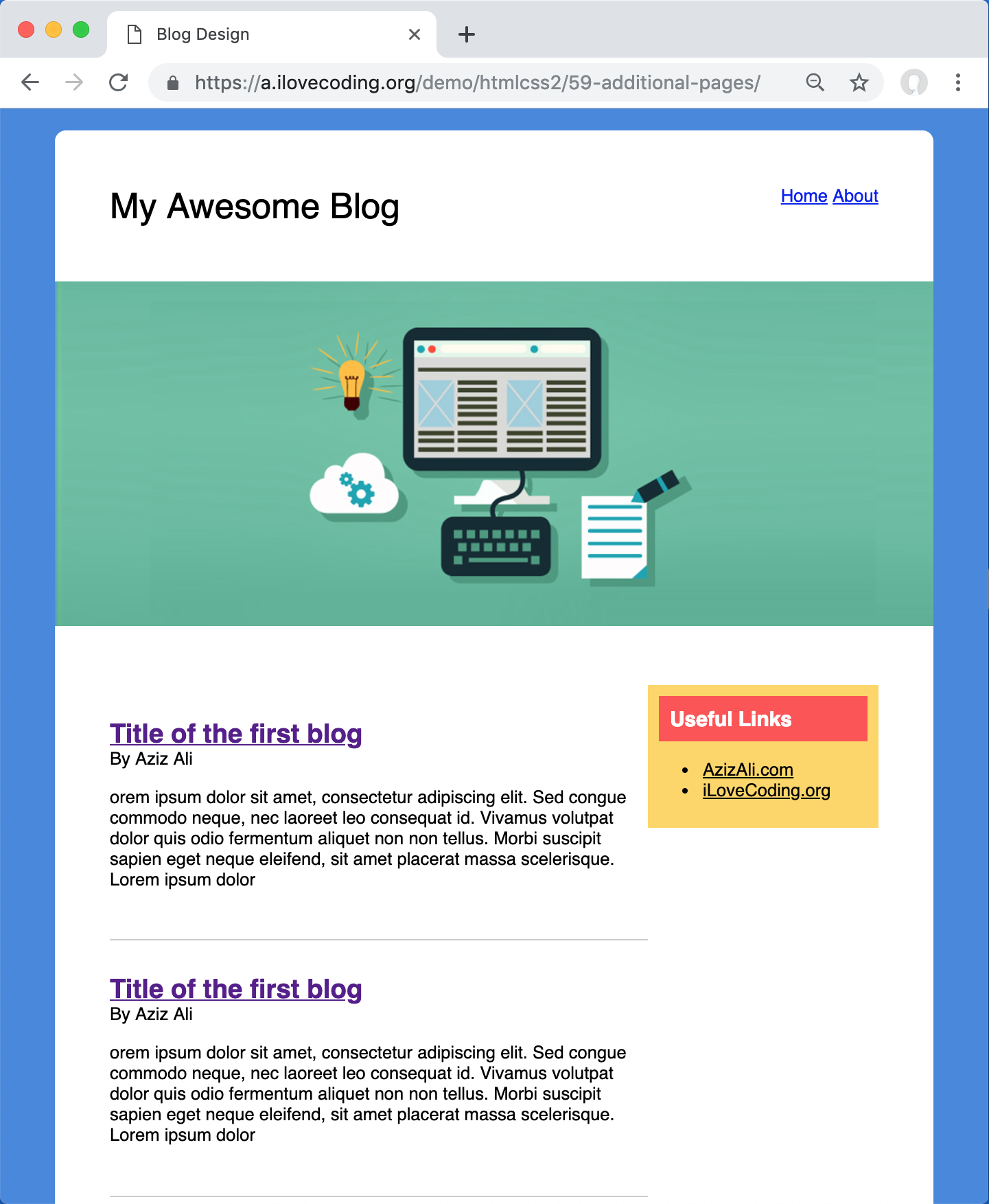

How is the course organized?
The course is organized such that you watch the video and follow along. If you simply watch the video and do not apply your learning, you will have an illusion of learning. So its important that you download the right software tools suggested and follow the instructions.
How long will it take me to learn HTML and CSS?
It may take you 1-2 weeks to complete the course, and about a month of practice to get comfortable with HTML and CSS. The key is to apply your learning and build projects. The easiest project you can create is your own personal website. You need your own presence online. Social media profiles are not enough. You want your own website where you can express yourself and your skills. This course will give you all the skills to build that website.
With more practice, you can start building websites for clients as well and start charging for your services.
Full Video Transcript
Do you want to build websites for yourself or for your clients? Then you must learn HTML and CSS.
Welcome to the learn HTML and CSS in 14 days course on iLoveCoding. I'm happy that you're here because this is an awesome comprehensive and detailed course on how to build simple and professional websites with HTML and CSS.
Now you may be asking what is HTML and CSS and why should you care. And why should you take this course? Those are awesome questions. You see HTML and CSS are two distinct coding languages used to make websites. The fact of the matter is that all websites are built with HTML and CSS and the Web would be impossible without it. Now, Yes! websites like Google.com, YouTube, Amazon, Twitter, Facebook, you name it - Any website, all websites, big and small are built with HTML and CSS.
HTML is used to put the structure of a website together and CSS is used to make your website look pretty with colors, styled and advanced layout. If you want to make websites even the most simplest websites or want to become a web designer, webmaster, or web developer, you must learn HTML and CSS. In fact, if you want to do anything with the tech or web world, I highly recommend you take this course because it's going to serve you well now and in the future of your career.
Now let's see what you will be learning in this course:
In this course you will learn what is HTML and CSS, what does it stand for. You will learn how to write simple websites and web pages using HTML and CSS. You will learn the basic syntax of HTML and how it's written. You will learn how to format your code like a professional. You will learn what tools to use and what tools not to use when coding. You will learn the basic terminologies used around the web world like "tags", "elements", "attributes" and you will get comfortable using these features and talking like in that particular lingo.
You will learn how to see the code of other websites using a tool called Chrome developer tools so you can see how other websites are coded so you can get inspiration from them and code your websites and enhance your websites accordingly.
You will learn how to make headlines titles, forms, tables, paragraphs. You will learn how to link your website with other websites or link the pages of your own websites together and you will learn everything in between on building these beautiful websites. You see an HTML consist of a lot of elements. I will share with you the most common elements that you must know about and then I will travel to you two trusted resources so you can look up more information whenever you need.
Kind of like a cheat sheet. Once you have a gist of HTML, then I will share with you the basics of CSS and how to use it to make your website look pretty and professional. Something like this.
Yes! we will be building this beautiful blog design together in this course. Plus, I will share with you some advance hacks that professional developers use. All in all, this course will give you the tools, training, resources, cheat sheets, and homework so you become comfortable in writing HTML and CSS, and building professional and beautiful looking websites. Remember one thing. The best way to learn is to manually hand copy the things that I teach you. So I recommend in this course that you watch the videos twice. The first time you watch it and ingest the concept and take notes and then the second time you watch it and then you copy along with me in your code editor and build what I am building. This way you will internalize and knowledge and you're going to learn by doing as well.
Just imagine when you create your first website how proud will you be? if that excites you. Let's get started.